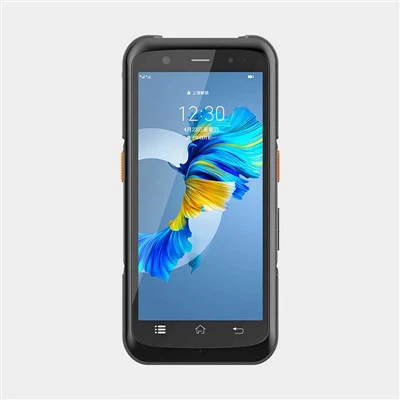
As a supplier of handheld RFID readers, I often encounter questions from customers about the software update mechanism of these devices. In this blog post, I will delve into the details of how the software on handheld RFID readers is updated, exploring the importance, processes, and benefits of keeping the software up - to - date.
Importance of Software Updates
Software updates for handheld RFID readers are crucial for several reasons. Firstly, they enhance the performance of the device. Over time, software developers identify areas where the reader's speed, accuracy, or efficiency can be improved. For example, an update might optimize the algorithm used to detect RFID tags, allowing the reader to capture more tags in a shorter period. This is particularly important in industries such as logistics and inventory management, where quick and accurate tag reading can significantly improve operational efficiency.
Secondly, software updates are essential for security. As technology evolves, so do the threats posed by hackers and malicious software. By regularly updating the software on handheld RFID readers, we can protect sensitive data stored on the device and transmitted between the reader and other systems. This is especially critical in sectors like healthcare and finance, where data privacy and security are of utmost importance.
Finally, software updates can add new features to the handheld RFID reader. These new features can expand the functionality of the device, enabling it to meet the changing needs of different industries. For instance, a new update might introduce support for a new type of RFID tag or provide integration with a popular enterprise resource planning (ERP) system.
Types of Handheld RFID Readers
Before discussing the update mechanism, it's important to briefly mention the different types of handheld RFID readers we offer. We have a wide range of products, including UHF RFID PDA, which combines the functionality of a personal digital assistant with UHF RFID reading capabilities. These devices are highly versatile and can be used in various applications, such as asset tracking and retail inventory management.
Our RFID Portable Reader Writer is another popular option. As the name suggests, it not only reads RFID tags but also has the ability to write data to them. This makes it suitable for applications where data needs to be updated on the tags, such as in manufacturing and supply chain management.
We also offer Phone Back Clip Rfid Reader, which can be easily attached to a smartphone. This type of reader provides a cost - effective and convenient solution for users who want to add RFID reading capabilities to their existing mobile devices.


Update Mechanisms
Over - the - Air (OTA) Updates
One of the most common update mechanisms for handheld RFID readers is over - the - air (OTA) updates. This method allows the device to receive software updates wirelessly, similar to how smartphones receive updates. OTA updates are convenient for users because they can be performed without the need to connect the device to a computer.
The process of an OTA update typically starts with the software vendor releasing a new version of the software. The vendor then sends a notification to the handheld RFID readers that are eligible for the update. The reader checks the available update and, if the user approves, downloads the update package from the vendor's server. Once the download is complete, the device installs the update, which may involve restarting the device.
OTA updates are beneficial for both users and vendors. For users, it means that they can keep their devices up - to - date without having to spend time and effort on manual updates. For vendors, OTA updates allow for quick dissemination of software fixes and new features, improving customer satisfaction.
USB - Based Updates
Another update mechanism is USB - based updates. In this method, the user connects the handheld RFID reader to a computer using a USB cable. The user then downloads the software update package from the vendor's website onto the computer. The update package is then transferred from the computer to the RFID reader via the USB connection.
USB - based updates are more suitable for situations where the device does not have access to a wireless network or when the user prefers a more manual approach. This method also allows for greater control over the update process, as the user can verify the integrity of the update package before installing it on the device.
SD Card Updates
Some handheld RFID readers support SD card updates. In this case, the user downloads the software update package onto an SD card using a computer. The SD card is then inserted into the RFID reader, and the device reads the update package from the card and installs it.
SD card updates are useful in environments where there is no network connectivity or when the device has limited built - in storage for downloading updates. However, this method requires the user to have an SD card and the ability to transfer files between the computer and the SD card.
The Update Process
Regardless of the update mechanism, the general process of updating the software on a handheld RFID reader involves several steps.
Step 1: Check for Updates
The first step is to check if there is a new software update available. This can be done automatically by the device if it is set to check for updates regularly. Alternatively, the user can manually initiate the update check through the device's settings menu.
Step 2: Download the Update
Once an update is detected, the next step is to download the update package. The size of the update package can vary depending on the nature of the update. For minor bug fixes, the package may be relatively small, while major updates that include new features may be larger.
Step 3: Install the Update
After the download is complete, the device will prompt the user to install the update. Before installing the update, the device may perform a series of checks to ensure that the update package is valid and compatible with the device. Once the checks are passed, the device installs the update, which may involve overwriting existing files and restarting the device.
Step 4: Verification
After the update is installed, the device may perform a verification process to ensure that the update was successful. This may involve running a series of tests to check the functionality of the device and the new features introduced by the update.
Benefits of Regular Updates
Regularly updating the software on handheld RFID readers offers numerous benefits. As mentioned earlier, it improves performance, enhances security, and adds new features. In addition, regular updates can extend the lifespan of the device. By keeping the software up - to - date, the device can continue to meet the evolving needs of the user and remain competitive in the market.
Regular updates also ensure compatibility with other systems and technologies. As new RFID standards and protocols are developed, software updates can enable the handheld RFID reader to support these new standards, allowing for seamless integration with other devices and systems.
Conclusion
In conclusion, the software update mechanism of handheld RFID readers is an important aspect of device management. Whether it's through OTA updates, USB - based updates, or SD card updates, keeping the software on these devices up - to - date is crucial for performance, security, and functionality.
As a supplier of handheld RFID readers, we are committed to providing our customers with high - quality software updates that enhance the value of our products. If you are interested in learning more about our handheld RFID readers or have any questions about the software update process, we encourage you to contact us for procurement and further discussions. We look forward to helping you find the best RFID solution for your business needs.
References
- "RFID Handbook: Fundamentals and Applications in Contactless Smart Cards, Radio Frequency Identification and Near - Field Communication" by Klaus Finkenzeller
- "Mobile Computing: Fundamentals, Techniques, and Applications" by Rajkumar Buyya and Srikumar Venugopal