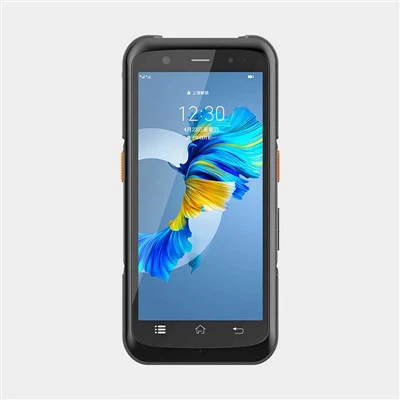
Integrating a UHF RFID PDA with existing business software can significantly enhance operational efficiency, accuracy, and productivity. As a UHF RFID PDA supplier, I understand the challenges and opportunities that come with this integration process. In this blog post, I will share some insights and practical steps on how to achieve a seamless integration.


Understanding the Basics of UHF RFID PDA and Business Software
Before diving into the integration process, it's essential to have a clear understanding of what a UHF RFID PDA is and how it can interact with your existing business software. A UHF RFID PDA, or Ultra - High Frequency Radio Frequency Identification Personal Digital Assistant, is a handheld device equipped with RFID technology. It can read and write data to RFID tags at a relatively long range compared to other frequencies, making it ideal for various applications such as inventory management, asset tracking, and supply chain logistics.
On the other hand, your existing business software could be an enterprise resource planning (ERP) system, a warehouse management system (WMS), or a customer relationship management (CRM) system. These software solutions are designed to manage different aspects of your business operations, and integrating a UHF RFID PDA can provide real - time data input, which can streamline processes and reduce human errors.
Assessing Your Business Needs
The first step in integrating a UHF RFID PDA with your existing business software is to assess your business needs. You need to identify the specific processes where RFID technology can bring the most value. For example, if you are in the retail industry, you might want to use RFID for inventory management to keep track of stock levels accurately. In a manufacturing environment, RFID can be used for asset tracking and production line monitoring.
Once you have identified the processes, you should list the requirements for the integration. This includes the type of data that needs to be transferred between the PDA and the software, the frequency of data updates, and any specific security or compliance requirements.
Choosing the Right UHF RFID PDA
As a UHF RFID PDA supplier, I know that there are many options available in the market. When choosing a PDA, you need to consider several factors. Firstly, the read range and sensitivity of the RFID reader are crucial. A higher read range allows you to scan multiple tags at once, which can improve efficiency. Secondly, the battery life of the PDA is important, especially if your employees will be using it for long periods. Thirdly, the operating system and software compatibility of the PDA should match your existing business software.
We offer a variety of UHF RFID PDAs, including RFID Tablet, Handheld RFID Reader, and RFID Portable Reader Writer. Each product has its own features and advantages, and we can help you select the one that best suits your needs.
Preparing Your Existing Business Software
Before integrating the UHF RFID PDA, you need to prepare your existing business software. This may involve checking if the software has an API (Application Programming Interface) that can be used to communicate with the PDA. An API allows different software applications to interact with each other by providing a set of rules and protocols.
If your software does not have an API, you may need to work with your software vendor to develop a custom integration solution. This could involve writing code to establish a connection between the PDA and the software, defining the data format for communication, and implementing error - handling mechanisms.
Establishing Communication between the PDA and the Software
Once you have chosen the right PDA and prepared your software, the next step is to establish communication between the two. There are several ways to do this, depending on the capabilities of your PDA and software.
One common method is to use a wireless network, such as Wi - Fi or Bluetooth. If your PDA supports Wi - Fi, you can connect it to your local network and communicate with the software server. Bluetooth can be used for short - range communication, which is useful if you need to transfer data between the PDA and a nearby device.
Another option is to use a USB connection. You can connect the PDA to a computer using a USB cable and transfer data directly. This method is more reliable but may be less convenient if you need to use the PDA in different locations.
Testing the Integration
After establishing communication, it's crucial to test the integration thoroughly. You should conduct both functional and performance tests. Functional tests ensure that the data is being transferred correctly between the PDA and the software. For example, you can scan a set of RFID tags using the PDA and check if the corresponding data is updated in the software.
Performance tests measure the speed and efficiency of the integration. You can test how long it takes to transfer a large amount of data and how many tags can be scanned and processed within a given time frame. Any issues or bugs identified during the testing phase should be addressed before deploying the integration in a live environment.
Training Your Employees
Even if the integration is successful, it will not be effective if your employees do not know how to use the UHF RFID PDA properly. Therefore, it's important to provide comprehensive training to your employees. The training should cover the basic operation of the PDA, such as how to scan tags, how to access and view data, and how to troubleshoot common problems.
You should also train your employees on how the integration with the business software works. They need to understand how the data they collect using the PDA will be used in the overall business processes. This will help them use the technology more effectively and ensure that the data they input is accurate.
Maintaining and Updating the Integration
Once the integration is deployed, you need to maintain and update it regularly. This includes keeping the PDA's software up - to - date, as software updates often include bug fixes, security patches, and new features. You also need to monitor the performance of the integration and make any necessary adjustments.
If your business processes change or if you need to add new functionality, you may need to update the integration accordingly. This could involve modifying the API, adding new data fields, or changing the communication protocol.
Conclusion
Integrating a UHF RFID PDA with your existing business software is a complex but rewarding process. It can bring significant benefits to your business, such as improved efficiency, accuracy, and productivity. As a UHF RFID PDA supplier, we are committed to helping you through every step of the integration process.
If you are interested in learning more about our UHF RFID PDAs or need assistance with the integration, we encourage you to contact us for a procurement discussion. Our team of experts will be happy to answer your questions and provide you with customized solutions.
References
- "RFID Handbook: Fundamentals and Applications in Contactless Smart Cards, Radio Frequency Identification and Near - Field Communication" by Klaus Finkenzeller
- "Enterprise Resource Planning: Concepts, Methodologies, Tools, and Applications" edited by Mehdi Khosrow - Pour