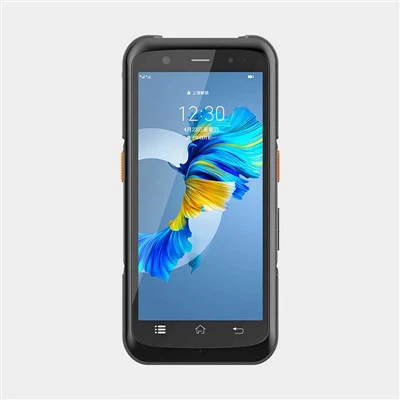
Hey there! As a supplier of Android PDA scanners, I often get asked a really interesting question: "Can an Android PDA Scanner scan barcodes in a moving object?" Well, let's dive right into this topic and find out.
First off, let's talk a bit about what an Android PDA scanner is. An Android PDA scanner is a powerful device that combines the functionality of a personal digital assistant with barcode scanning capabilities. It runs on the Android operating system, which means it's user - friendly and has access to a wide range of apps. You can check out our Rugged PDA and Handheld Scanner Android models, which are some of the best in the market.
Now, back to the main question. The short answer is yes, an Android PDA scanner can scan barcodes on moving objects, but there are several factors at play.
Factors Affecting Scanning of Moving Objects
1. Scanner Technology
There are different types of barcode scanning technologies used in Android PDA scanners, such as laser scanners and imager scanners. Laser scanners work by emitting a laser beam that reflects off the barcode and is then read by a sensor. Imager scanners, on the other hand, take a picture of the barcode and use software to decode it.
Imager scanners are generally better at scanning moving objects. They can capture a barcode image in a fraction of a second, which means they can handle objects moving at a relatively high speed. Our PDA Barcode Scanner models are equipped with high - quality imager scanners that are designed to perform well even when scanning moving items.
2. Barcode Quality
The quality of the barcode itself is crucial. A barcode that is smudged, damaged, or has low contrast will be much harder to scan, especially if the object is moving. If the barcode is printed with poor quality ink or on a rough surface, the scanner may have trouble reading it. For example, if you're trying to scan a barcode on a moving box that has been exposed to the elements and the ink has faded, it's going to be a challenge for any scanner.
3. Speed of the Moving Object
The speed at which the object is moving matters a lot. If an object is moving too fast, the scanner may not have enough time to capture a clear image or read the barcode. Most Android PDA scanners can handle objects moving at a moderate speed, say up to a few feet per second. But if you're dealing with objects moving at extremely high speeds, like on a high - speed conveyor belt in a factory, you may need to invest in a more advanced scanner.
4. Distance between the Scanner and the Object
The distance between the scanner and the moving object also affects scanning performance. If the object is too far away, the scanner may not be able to get a clear view of the barcode. On the other hand, if it's too close, it may not be able to focus properly. Most scanners have an optimal scanning distance range, and it's important to keep the moving object within this range for successful scans.
Real - World Applications
There are many real - world scenarios where scanning barcodes on moving objects is necessary.
1. Warehousing and Logistics
In a warehouse, products are constantly moving on conveyor belts or being carried by forklifts. Android PDA scanners are used to scan barcodes on these moving items to track inventory, manage shipments, and ensure accurate order fulfillment. For example, when a box moves along a conveyor belt, a worker can use an Android PDA scanner to quickly scan the barcode and update the system with the product's location and status.
2. Retail
At the checkout counter in a retail store, items are often moving quickly as they are being scanned. An Android PDA scanner can be used to scan barcodes on these moving products, making the checkout process faster and more efficient. It can also be used by store employees to conduct inventory audits on the sales floor, scanning barcodes on items as they move around the store.
3. Manufacturing
In a manufacturing plant, parts and products are in constant motion on assembly lines. Android PDA scanners can be used to scan barcodes on these moving components to ensure quality control, track the progress of production, and manage inventory of raw materials and finished goods.
Tips for Successful Scanning of Moving Objects
If you're planning to use an Android PDA scanner to scan barcodes on moving objects, here are some tips to help you get the best results:
- Choose the Right Scanner: As mentioned earlier, imager scanners are generally better for scanning moving objects. Make sure to select a high - quality scanner with good speed and accuracy.
- Proper Training: Ensure that the users are properly trained on how to use the scanner effectively. They should know the optimal scanning distance, how to hold the scanner, and how to handle different types of barcodes.
- Maintain Barcode Quality: If possible, ensure that the barcodes are printed clearly and are in good condition. This can significantly improve the scanning success rate.
- Optimize the Environment: Minimize any factors that could disrupt the scanning process, such as bright lights or excessive vibrations.
In conclusion, an Android PDA scanner can definitely scan barcodes on moving objects, but it depends on several factors. With the right technology, proper barcode quality, and a good understanding of the scanning process, you can achieve high - success rates in scanning barcodes on moving items.


If you're interested in our Android PDA scanners and want to learn more about how they can benefit your business, whether it's for warehousing, retail, or manufacturing applications, don't hesitate to reach out to start a procurement discussion.
References
- "Barcode Technology Handbook", Industry Standard Press
- "Mobile Computing for Logistics and Warehousing", Tech Insights Publications